Overview
Overview

The Overview is the page you land on. It answers three questions in order: how is my fleet doing, which server is the problem, and what is slow across all of them. With one server it is the same page with one row.
The page has five parts.
- State of the fleet. Counts of servers, healthy, degraded, critical, silent and gone.
- Fleet totals. Requests, errors, p95 and queries per request across the servers that are reporting. Each tile names the worst server under its number.
- The fleet. One row or card per server, worst first, with a switch between Table and Cards that is kept in your browser.
- Across the whole fleet. The slowest requests, SQL, HTTP calls, MCP servers and AI agents, added up over the servers.
- How states are decided. The limits in use, with a Customize button that opens Settings.
Seeing other servers is BoxLang+. Free is one server only. It shows this server in full, and when other servers are found in the shared store folder it blurs them behind an upgrade card. BxLens counts the folders and sends nothing else about those servers. See Licensing.

States
Each server is judged from the health snapshot it saved, the 5xx rate of its saved report and how old its last save is.
| State | Meaning |
|---|---|
| healthy | Nothing over a limit. |
| degraded | Heap, CPU or the fullest volume over its warning limit, scheduled tasks failing, or 5xx errors over their limit. |
| critical | A deadlock, requests waiting for a connection, or heap, CPU or the fullest volume over its critical limit. |
| silent | No health save for 3 minutes. It still counts as a problem, and what it saved last is too old to add up. |
| gone | No health save for 15 minutes. It leaves the counts and the totals and moves to the Gone tab. |
The limits are settings you can change, see fleet. The fullest volume uses volumes.warnPct and volumes.critPct, the same limits as the System page. The legend at the bottom of the page lists the values this server is using now, and the Customize button opens the Fleet card in Settings (changing needs BoxLang+). Each server judges the fleet with its own values. The reason of a server is written next to it, for example "Heap 91%, 2 scheduled tasks are failing".

The fleet

The Table has the server (with an icon for what it runs in), its state and why, heap and CPU with a small meter, requests per second, errors, p95, the fullest volume, and the BoxLang and Java versions. The Cards show the same. Click a server to open its System page, which now shows that server's saved data, read only (see Servers).
-
Groups. Set
server.groupon a server (for exampleprod-weborbatch) and the fleet is sorted by group, with a header for each group and a selector above the table. The counts and totals follow the selector. Servers without a group are listed last.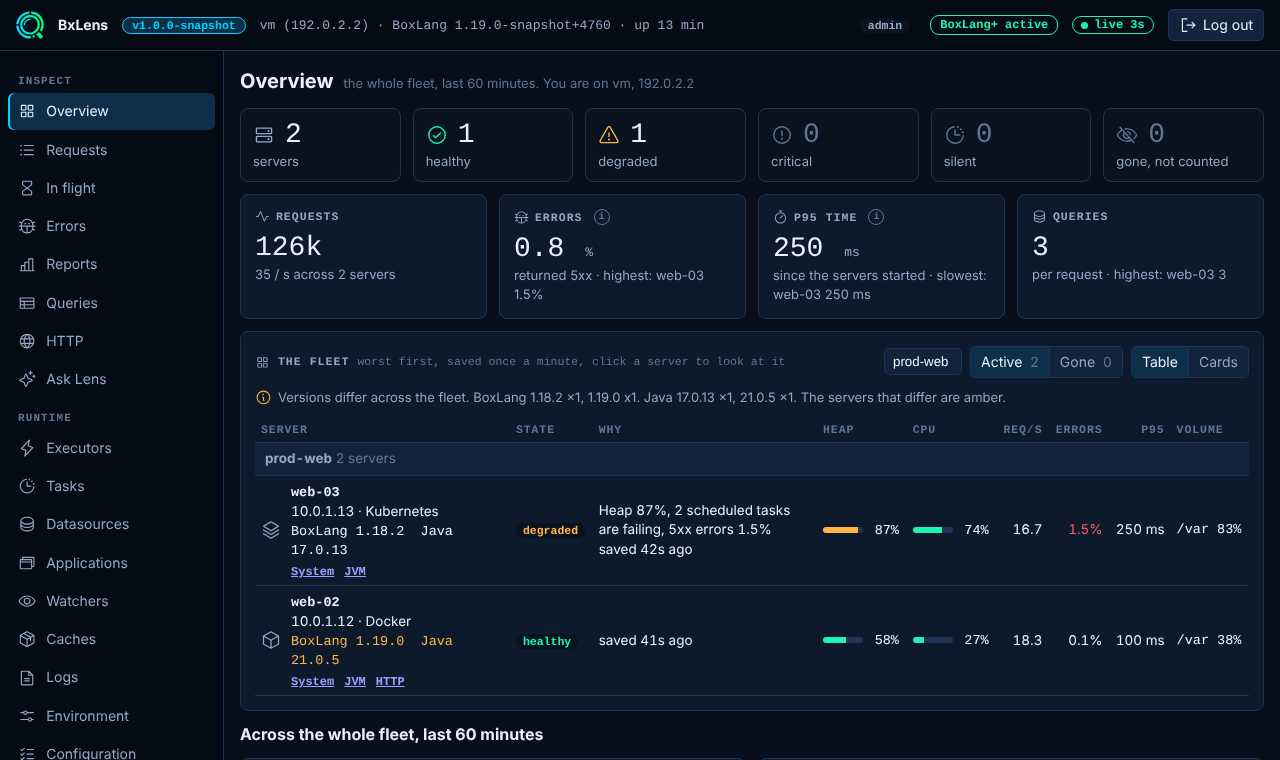
-
Kind and icon. A host (Linux, Windows or macOS), Docker, Podman, LXC, Kubernetes, AWS Lambda, AWS ECS, Google Cloud Run and Azure App Service each have an icon. BxLens finds them from the container markers and from which environment variables are set (never their values). Set
server.kindto give a Docker Swarm node its own icon, which cannot be detected from inside a container. Seeserver. -
Versions. The BoxLang and Java version of each server is shown. When versions differ across the fleet a line lists them with counts, and the servers that differ from the most common one are amber.
-
Go deeper. Each server has links to its System and JVM pages, and to the page that matches its main reason: Datasources for requests waiting for a connection, Tasks for failing tasks, Reports for 5xx errors, HTTP when it has no problem. A silent server only offers its last saved System page.

Gone servers

Containers, pods and functions come and go, and each one saves its own folder. A server that has not saved for 15 minutes (fleet.goneMin) moves from Active to the Gone tab. A gone server is not counted as a problem and is not part of the totals or the reports. The tab lists, for each one, when it was last seen, how it was doing, its versions, a note, and a link to its last saved data. A server that saves again moves back to Active by itself.
The folder of a gone server stays until store.staleAfterHours or the retention removes it. An admin can remove it sooner with Forget (BoxLang+, the console must not be read only): type the server id to confirm, and the folder is removed only if it really has not been written for the gone limit. This server cannot forget itself. Forgetting is written to the audit log as server.forget.
Across the whole fleet
Each list shows the five slowest. The numbers come from the files each server saved, so they can be a minute behind.
| List | Ranked by | Notes |
|---|---|---|
| Slowest requests | p95 of the route, from the latency counts of every server added together | A route saved by an older BxLens, without counts, is ranked by its average. The column "Worst on" names the server with the slowest p95 for that route. Counts since each server started. |
| Slowest SQL | Average time of a statement | The same statement on the same datasource is one row, added up over the servers. A statement needs three runs. |
| Slowest HTTP calls | p95 of the outgoing call, by host and endpoint | The last hour, from the HTTP rollups. |
| Slowest MCP servers | p95 | MCP servers hosted here with bx-ai, and MCP servers the agents call. The column "Blocked" counts calls turned away by a rate limit. |
| Slowest AI agents | p95 of a run | With the tokens they used. |
Gone servers are left out. On Free the lists show this server only. Open full report opens the page behind the list, on all servers when you have BoxLang+ and more than one server.
Data and refresh
Every number on this page is read from a file a server saved, never from another server's memory, and this server is read live. The page asks again every 15 seconds while it is open, and the server reuses what it read for 10 seconds. See Several servers and the store.
| Endpoint | What it returns |
|---|---|
GET overview/fleet?group= | The counts, totals, versions, active servers, gone servers and the limits in use. Free also gets locked, the number of other servers found, and nothing about them. |
GET overview/reports?group= | The five lists. |
POST overview/forget | Forget a gone server (id and confirm). Admin, BoxLang+, not read only. |